

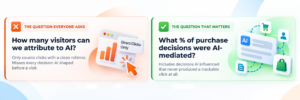
One of the most common gaps I see when I audit an advertiser’s marketing analytics setup is not a matter of the quality of their data. It is a way of asking about it. The question being asked is: How many visitors can we attribute to Artificial Intelligence?
This is not the correct question. The proper question should be: What percent of our real-world purchasing decisions were mediated by AI? And that includes all of those purchasing decisions which never resulted in a measurable click.
These are two very different types of information, so the two questions will also have different answers. Closing this type of gap is going to require an understanding of the measurement environment as it has evolved since 2026. A few of the manual methods I outlined above for achieving that end result have been partially replaced with native platform upgrades.
What Changed in 2026: The Native Measurement Landscape
Two significant platform updates arrived in 2026 that every marketing analytics team needs to know about.
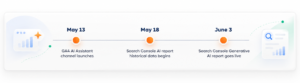
Google announced it had integrated an AI assistant into Google’s native analytics, through its new “Default Channel Group” for the first time on May 13th, 2026. A user does not need to configure anything for qualifying traffic from known AI assistants (including ChatGPT, Gemini, and Claude) to be tagged as a medium of ai-assistant and placed into a new channel called AI Assistant in their standard acquisition reporting. When looking at the standard User Acquisition report in GA4, users will also see AI Assistant listed as row 9 alongside rows for Paid Search, Organic Search, and Direct. Users do not need to create a custom view to include this data. The source for this information comes from the “What’s New” section of Google Analytics, and was published on May 13th, 2026.
Search Console has developed new generative AI-specific performance reports, which were released to all site owners who use Search Console on June 3rd, 2026. Prior to these reports being made available to all site owners, site owners could manually track and measure the impact of Generative AI features in Search Console. Site owners can now use the reports to track specific metrics about how well their content is doing when viewed via the AI Overview, AI mode, and Discover’s AI feature. Impressions tracked in the report are broken down by page, country, device type, and date range. While the report is currently only available to a select group of website owners in the United Kingdom (with plans to expand globally), historical data within the report begins around May 18th, 2026, with no additional backfilled data included. The source for this information comes directly from the Search Generative AI Performance Reports. Both of these updates provide actual enhancements over the previous methods (manual tracking or creating custom views) for viewing this data; however, both updates contain significant limitations. Those limitations should greatly influence how you analyze the data.
What the Native Tools Still Miss: The Dark Traffic Problem
The AI Assistant Channel in Google Analytics 4 captures AI-referred visitors where there is a clean referrer header from an identified AI platform. These conditions are broken in three primary use cases. Understanding these is necessary to avoid drawing incorrect conclusions from the data from the AI Assistant Channel.
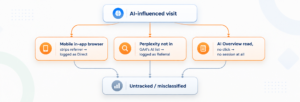
Mobile Apps are the biggest flaw. When a user views an answer via the ChatGPT iOS or Android App, or the Gemini app, and after they view their answer, they open a web browser to navigate to a website owned by you, the browser will usually be either a system browser or in-app browser, which doesn’t pass on the original referrer. Therefore, when you get into Google Analytics 4, there will be no identifying information regarding the source being an AI Assistant and it will be classified under direct traffic. There isn’t anything wrong with your Google Analytics 4 settings, it’s simply the way that mobile operating systems treat referrer data between apps and browsers.
The above scenario is a valid and widespread hypothesis, supported by the anomaly patterns experienced by data analysts who work with brands experiencing strong AI citation rates within prompt audit analysis, yet lower-than-expected GA4 AI Assistant channel sessions, and anomalous conversion rate spikes in Direct traffic that would indicate a much more engaged visitor type than typical brand recall visits. The mobile app referrer gap is the most likely structural explanation. However, until tested at the individual account level, it will remain a hypothesis.
While perplexity is not listed as one of Google Analytics’ recognized AI assistants and therefore still gets credited as Referral. For B2B-specific audiences, this is particularly important. Perplexity has a user base skewed towards senior-level, research-oriented B2B buyers. According to Goodie’s 2026 AI Search Traffic Report, about 30 percent of Perplexity’s users are senior-level executives — the largest percentage of any AI platform. A B2B brand that is optimizing for executive buyer awareness and visibility that does not track separate referral sessions to Perplexity.ai is losing a high value signal.
When a user reads an AI Overview but does not click through, there are no sessions generated anywhere. The brand received a reference; the buyer read it; No analytics record was made. The only downstream signal available to measure the engagement of the reader of the overview is branded search lift, which is described further down in this post.
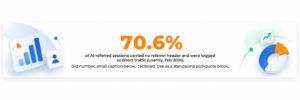
Loamly studied 446,000 visits across its customers and determined that 70.6% of all detected AI-referred sessions did not carry a referrer header and therefore were misclassified as direct traffic in GA4 (Loamly — Updated February 2026).
The Search Console Generative AI Report: What It Tells You and What It Does Not
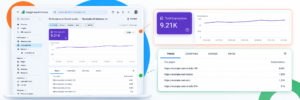
The new Search Console report, shown in the screenshot provided for this article, is the first natively Google-made tool to give site owners impression data based on their website’s content as it is viewed by users who have used AI-generated features.
The screenshot reflects 9,210 total impressions over a one-week period during which the total number of impressions has been steadily increasing since May through June 2026. This is significant as it indicates that at least some of the site’s content is being presented within the user interface of both AI Overview and AI Mode, and there has also been an increase in the number of times these surfaces appear.
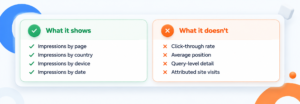
You will be able to view impression data for each page of your site, by country, by device, and by date. Therefore, you will know exactly what pages are being surfaced within AI-based feature interfaces, where your AI visibility is most pronounced per country, and you will also be able to track trends over time.
However, the Search Console Generative AI report does not offer click data. Therefore, there will be no click-through rate available, no average position available, and no query-level detail currently. A spokesperson from Google confirmed that they plan to add additional metrics in the future but did not indicate when those metrics would be added. Thus, the Search Console Generative AI report allows you to determine whether your site’s content is visible within AI features; however, it does not allow you to identify how much of that visibility results in actual site visits. Source: Google Search Console AI performance reports.
There is a good way to use the “cross-signal” method to understand why your Search Console AI impressions are up, but your GA4 AI Assistant channel session numbers are flat. If Search Console AI impressions are going up but GA4 AI Assistant channel sessions are not changing then the difference between them is probably due to the lack of click data in Search Console and/or the fact that mobile referrers are being stripped. An increase in impressions when direct click attribution remains constant is not necessarily bad news. It may be indicative of how AI assists users in developing awareness and interest for your product/services/brand. Awareness and interest occur within the AI response (i.e., when the user views your information), and the subsequent visit occurs via a brand search or by navigating directly to your site rather than by clicking on a link.
How Adobe Analytics Tracks AI Traffic
While there are similarities between how BFSI clients and enterprise brands classify Adobe Analytics traffic compared to their classification of GA4 traffic, there are significant structural differences as well.
One major area of difference is with regard to Referrers. In Adobe’s Analysis Workspace, they have built a pre-defined list of conversational AI tools into the “Referrer” Dimension. This Dimension has been designed to help users identify the Sessions that originated from known AI Platforms. A user can simply look up the Session Details or drill-down on these Dimensions to find out which AI Platform was used to refer the user to your website. Additionally, this information can be found in the Adobe Documentation related to the identification and tracking of AI Traffic in Adobe Analytics.
Customer Journey Analytics (CJA) enables users to filter and categorize traffic generated by Artificial Intelligence (AI), through the use of Derived Fields and Segments. CJA enables users to differentiate between two types of AI-Generated Traffic; namely, referrals from AI Platforms (Users accessing your website via links provided by an AI Platform), and Crawlers (Agents such as GPTBot, ClaudeBot, etc., which crawl your website while trying to retrieve Content). This differentiation is very important for BFSI Brands, since it will enable them to ensure that they meet Compliance Reporting Requirements and maintain Accurate Analytical Data.
In addition to providing identification capabilities for AI-Generated Traffic, Adobe offers a tool called LLM Optimizer that provides integration capabilities with both Adobe Analytics and GA4. Once integrated, LLM Optimizer provides a separate View of all AI-Referred Traffic, along with a capability to Track Citations made by Large Language Models (LLMs). The Referral Traffic Dashboard within the LLM Optimizer Tool shows Views of Referrals broken down by Source (e.g, OpenAI, Microsoft, Google, Perplexity), along with Engagement Metrics such as Bounce Rate and Pages/Visit per Source.
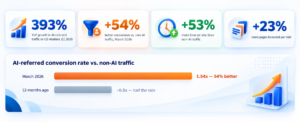
Adobe’s own analytics data provides some of the strongest published evidence on AI traffic quality. Adobe Analytics found that AI-referred traffic to US retailers grew 393% year-over-year in Q1 2026. More significantly, visitors arriving from AI platforms converted 54% better than non-AI traffic in March 2026, a complete reversal from twelve months earlier when AI-referred visitors converted at roughly half the non-AI rate. Visitors also spent 53% more time on site and browsed 23% more pages per visit than non-AI traffic. Source: Adobe Analytics, April and June 2026 reports.
Structurally speaking this is an important aspect of the conversion data. Visitors referred by AI go into your site with significant intent and consideration, as they have done all of the pre-purchase research (comparing options, asking additional questions, narrowing down choices) prior to being directed to your site via AI. In other words the visitor’s click from the AI is essentially the last act in a purchasing process which has taken place primarily within the boundaries of the AI. Therefore, when you look at conversions for the AI referred channel you can expect it will perform similar to a highly intentional branded search versus an untargeted awareness channel.
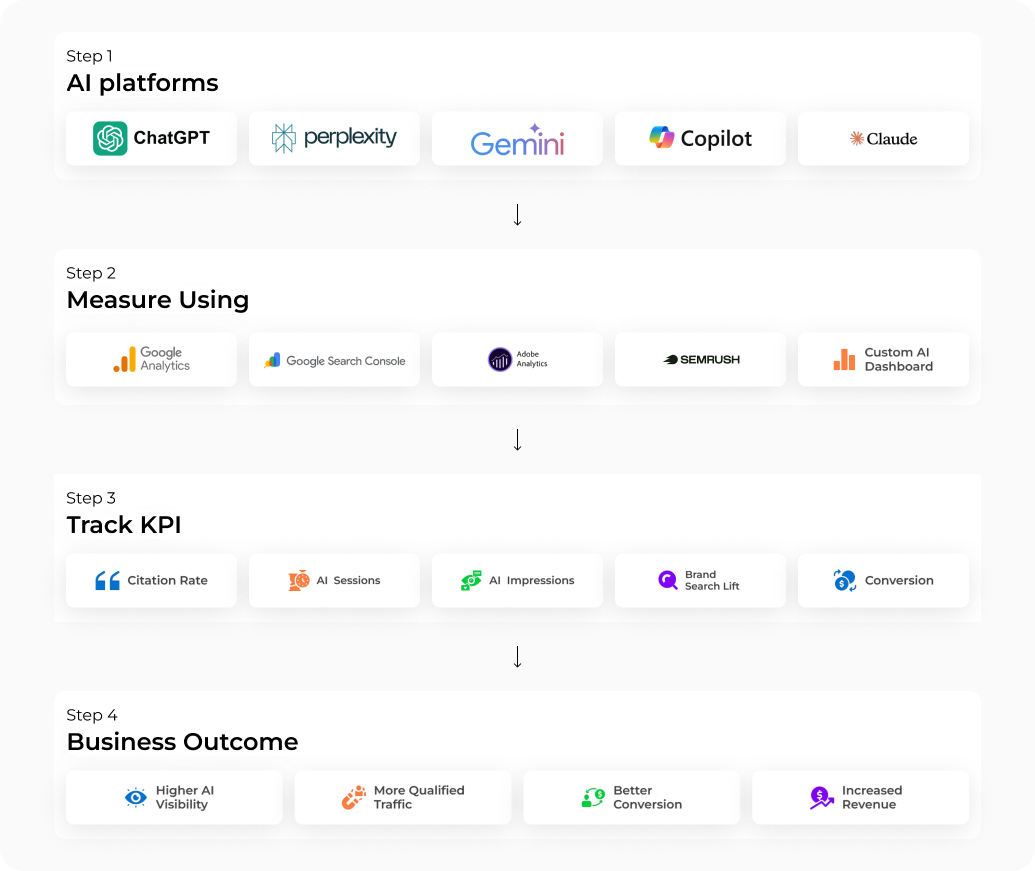
The Five Metrics That Actually Matter

- Brand citation rate: how often your brand is mentioned by name when the 20 to 25 prompts most relevant to your category are run across ChatGPT, Perplexity, Gemini, and AI Overviews. This is the primary metric. It measures visibility inside AI responses, not downstream clicks, and it is the only metric that captures the full reach of your AI presence including the impressions that never produce a trackable visit.
- Share of model: your citation rate versus your three closest competitors across the same prompt set, tracked over time. A brand cited in 30% of relevant AI answers while its nearest competitor appears in 60% has a concrete gap to close. A brand cited in 30% while competitors are cited in 10% has a position to protect.
- GA4 AI Assistant channel sessions: the direct, trackable click-through from recognized AI platforms. Treat this as the floor of your actual AI-driven traffic, not the ceiling. Between 35% and 70% of AI-originated sessions are likely arriving through Direct or Referral due to the mobile app referrer gap and Perplexity’s absence from the native list.
- Search Console Generative AI impressions: the count of times your pages appeared inside AI Overviews, AI Mode, and Discover AI features on Google. This metric measures visibility independent of click behavior. Pair it with GA4 data to understand the ratio between impressions and attributed visits, and track it monthly for trend direction.
- Branded search lift: month-over-month change in direct branded search volume correlated against citation rate movement. When citation rate increases and branded search follows two to four weeks later, you have evidence that AI exposure is generating awareness and recall, even when those eventual visits enter GA4 as Organic Search or Direct rather than AI Assistant.
The Full Measurement Stack: How to Set It Up
For GA4 users, the AI Assistant channel is now native and requires no setup. However, the following additions close the gaps that the native channel leaves open.
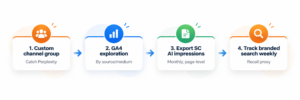
First: Build a custom channel group that captures Perplexity and any other AI platforms not in Google’s native recognized list. In GA4, go to Admin, Data Settings, Channel Groups, New Channel Group. Add a condition: Source contains perplexity.ai. This captures Perplexity referral sessions that are currently landing in generic Referral. Check Google’s Default Channel Group help page periodically, as the recognized AI assistant list is updated without advance notice.
Second: Build a custom exploration in GA4 that shows GA4 AI Assistant channel sessions broken down by source and medium. A GA4 Exploration report can be used to analyze AI traffic by source and medium, allowing you to compare traffic from platforms such as ChatGPT, Claude, Gemini, and Perplexity. This level of granularity is not available in the standard channel group view but is straightforward to build in Explorations.
Third: Access Search Console Generative AI impressions data via the dedicated report under Performance if your property has it. Export the page-level data monthly and cross-reference it against your priority pages from the AIO audit. Pages with high AI impressions but no GA4 AI channel sessions are your clearest evidence of the referrer stripping gap.
Fourth: Track branded search volume weekly in Search Console’s standard Performance report filtered to branded queries. A rise in branded search volume that does not correlate with other organic activity or paid spend is your best available proxy for the AI-influence effect on buyer recall.
For more advanced attribution, server-side Google Tag Manager can be configured to analyze incoming request headers and behavioral patterns before they reach GA4, identifying AI-originated sessions even when the referrer has been stripped. This is a more significant technical implementation, typically requiring an analytics engineer, but it provides the most complete picture of actual AI-sourced traffic volume.
The Attribution Mindset Shift This Requires
Beginning with the notion of accurate AI traffic measurement, it’s necessary to accept the fact that not all channels will have an influence that can be assigned to a session. In addition, not all sessions can be assigned solely to one channel.

As such, AI mediated discovery typically acts as a consideration layer before a measurable visit (hours, days, or weeks prior). On Tuesday a consumer finds their brand information from your company in a ChatGPT response. Then they perform a Google search for your brand on Thursday. By Friday they land on your website from a paid search ad and then convert. Using GA4, the conversion is credited to Paid Search and last click. The ChatGPT reference on Tuesday was unattributable within the last-click model.
While this is not the first instance of AI contributing to this problem, there are similar dynamics present in measuring the effect of a podcast mention, or out of home advertising (or any other non-click-through channel) to create awareness. To solve this measurement challenge use citation rate to measure upper-funnel activity; use branded search lift to measure downstream signals; and link these together over time to define patterns of contributions.
To this discipline, what AI measurement provides is a citation rate metric as an upper funnel proxy. This is a concept that does not exist in traditional media. Brands’ citation rates across a specific set of prompts represent a quantifiable audit-able measure of a brands’ visibility at the moment buyers intend to buy, regardless if the brands’ visibility results in an identifiable click. As such, each quarter’s marketing review should include citation rates along side organic rankings, paid performance and conversion rates.
The current measurement infrastructure exists today to enable better accuracy in attributing AI’s contribution than most brands currently attribute. With native channel reporting in GA4; with the Search Console AI reports; with Referrer Type Dimensions available natively in Adobe Analytics; and with the supplemental configurations mentioned earlier, marketers now have the tools to close nearly all remaining attribution gaps. Therefore, while tooling still exists to facilitate this level of attribution, the major barrier preventing greater levels of attribution is the marketer’s investment into developing an acceptable attribution model based upon recognizing multiple channel influences versus attempting to assign attribution of every dollar using only one source.
Sources cited in this article:
Google Analytics What’s New, May 13, 2026: (support.google.com/analytics/answer/9164320)
Google Search Console AI performance reports, June 3, 2026: (developers.google.com/search/blog/2026/06/gen-ai-performance-reports)
Adobe Analytics AI traffic documentation: (experienceleague.adobe.com/en/docs/analytics/technotes/ai-traffic)
Adobe Analytics Q2 2026 AI Traffic Report, April 16, 2026: (business.adobe.com/resources/sdk/2026-q2-ai-traffic-report.html)
Search Engine Land, June 3, 2026: (searchengineland.com/google-search-console-ai-performance-reports)
Loamly, updated February 2026: https://www.loamly.ai/blog/ai-traffic-attribution-crisis
FAQ’s
What changed in AI traffic measurement in 2026?
Two native updates: GA4 added an AI Assistant channel to its Default Channel Group on May 13, 2026, and Google Search Console launched a dedicated Generative AI performance report on June 3, 2026, showing impressions from AI Overviews and AI Mode.
Why does GA4’s AI Assistant channel undercount actual AI traffic?
Because it only captures sessions with a clean referrer header from a recognized AI platform. Mobile in-app browsers strip that referrer entirely, Perplexity isn’t in GA4’s recognized list yet, and AI Overview impressions with no click never generate a session at all, so treat the channel as a floor, not a ceiling.
What are the five metrics that actually matter for AIO?
Brand citation rate, share of model (your citation rate versus close competitors), GA4 AI Assistant channel sessions, Search Console Generative AI impressions, and branded search lift.
Does the new Search Console Generative AI report show click data?
No. The report includes data related to the number of impressions by Page, Country, Device and Date; however, it will provide no Click-Through Rate, Average Position, or Query-Level Breakdowns. According to Google, additional metrics are being developed but they haven’t announced a release timeline.
How should marketing teams think about AI attribution given these gaps?
Accept that not every channel influence maps to a single trackable session. Track upper-funnel visibility through citation rate and impressions, track the downstream signal through branded search lift, and connect the two over time rather than demanding single-source attribution for every AI-influenced conversion.

Kaushal Thakkar
Founder & CEO, Infidigit